> For the complete documentation index, see [llms.txt](https://docs.kairos.com/documentation/llms.txt). Markdown versions of documentation pages are available by appending `.md` to page URLs; this page is available as [Markdown](https://docs.kairos.com/documentation/api-documentation-v0.1/overview/recommendations-and-file-formats.md).
# Recommendations & File Formats
How to get the best results and optimize success rate
### Introduction
In this segment, we provide comprehensive guidelines and recommendations to ensure the seamless capture or upload of ID documents and selfies. These practices are crucial for maintaining high standards of user verification and authentication, which are integral to the security and reliability of digital onboarding processes.
Our API is designed to facilitate a user-friendly onboarding experience while adhering to rigorous verification standards. Proper image capture is essential to this process, as it significantly enhances the accuracy of identity verification and minimizes the potential for errors.
We'll cover the key elements of effective image capture, including lighting, positioning, and background considerations. Additionally, we will delve into the technical specifications required for image uploads, such as resolution, format, and size, to ensure compatibility with our API.
By following these best practices, you can expect a streamlined verification process, leading to an improved success rate in user onboarding and a better overall user experience. Let’s get started on setting the stage for optimal image submission.
### Selfie Capture
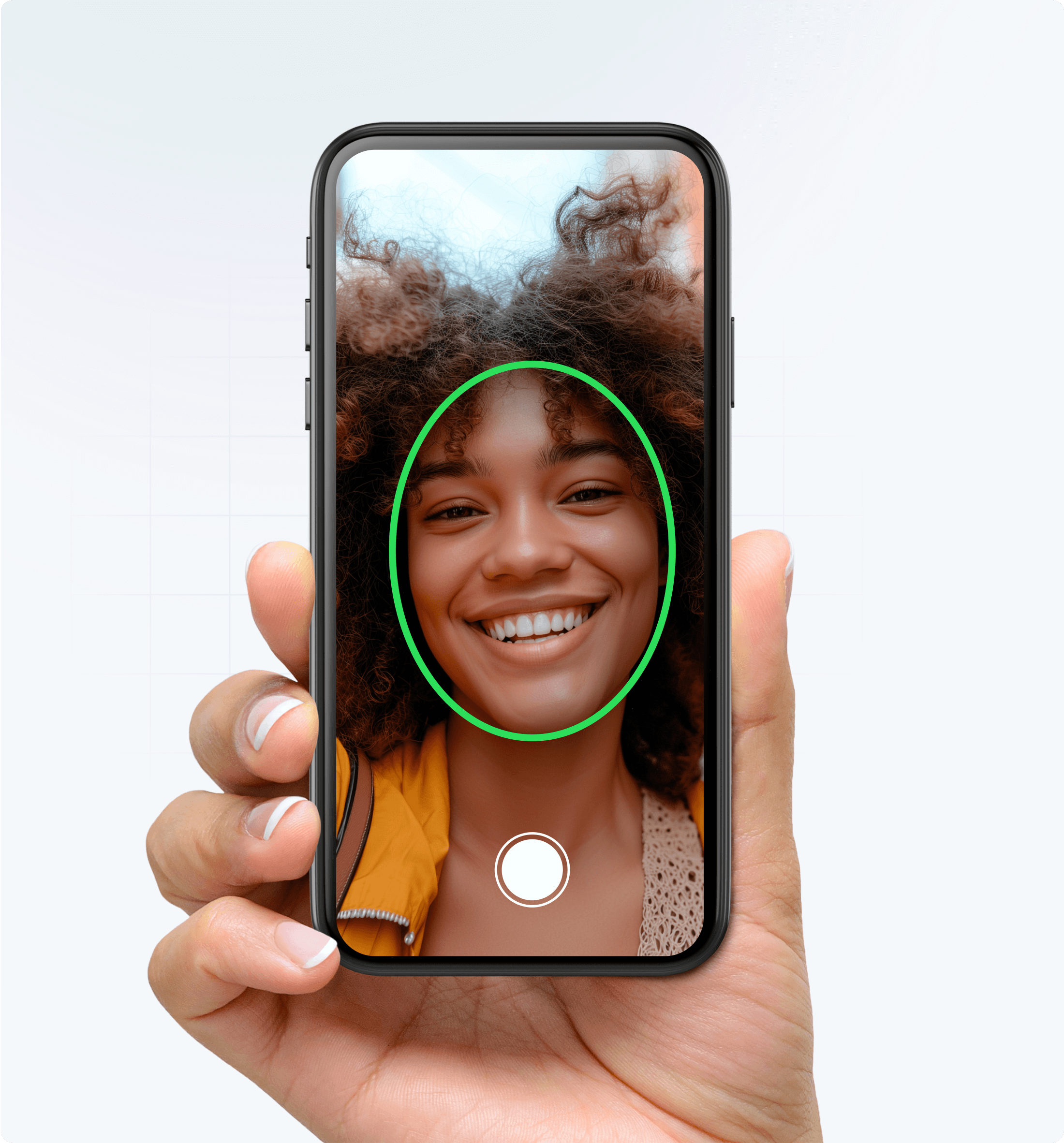
Kairos recommends taking a selfie directly from a mobile phone to ensure the most effective liveness checks.
Position yourself head on with your face completely within the oval. Make sure the face takes up 60-70% of the frame
**Positioning**
Face the camera directly and position yourself so that your face fills 60% - 70% of the frame. Try to avoid extreme angles and poses.
**Expressions**
Maintain a neutral expression, remove any dark glasses or tinted lenses, and keep both eyes open.
**Lighting**
For increased visibility, avoid bright backlighting and glare by taking your photographs under even light.
**Focus & Movement**
Image focus and blur can have similar effects on performance as low resolution - make sure your captured image is not blurry.
If the camera is having difficulty focusing, you might be too close or too far from the device.
#### Orientation
Do not rotate the camera or tablet when taking the photo. Take the photo as a portrait, not a landscape.
### Document Capture
**Positioning**
Position the ID document so that it fills 60% - 70% of the frame. Try to avoid extreme angles and poses.
**Lighting**
For increased visibility, avoid bright backlighting and glare by taking your photographs under even light.
**Focus & Movement**
Image focus and blur can have similar effects on performance as low resolution - make sure your captured image is not blurry.
If the camera is having difficulty focusing, you might be too close or too far from the device.
#### Orientation
Do not rotate the camera or tablet when taking the photo. Take the photo with as a portrait not a landscape.
### General
When uploading photos, the following file formats can be uploaded:
* **JPG (JPEG Image File):** Commonly used for photographs and ID card images, balancing quality and file size.
* **PNG (Portable Network Graphics):** Ideal for images with transparency or requiring high quality, such as detailed ID documents.
We do not recommend uploading photo files because it makes liveness detection less accurate. If uploading a selfie, make sure to meet these minimums for the file.
---
# Agent Instructions
This documentation is published with GitBook. GitBook is the documentation platform designed so that both humans and AI agents can read, navigate, and reason over technical content effectively. Learn more at gitbook.com.
## Querying This Documentation
If you need additional information that is not directly available in this page, you can query the documentation by asking a question.
Perform an HTTP GET request on the following URL with the `ask` and `goal` query parameters:
```
GET https://docs.kairos.com/documentation/api-documentation-v0.1/overview/recommendations-and-file-formats.md?ask=&goal=
```
`ask` is the immediate question: it should be specific, self-contained, and written in natural language.
`goal` is what the user is ultimately trying to achieve, the reason they need the answer. Sharing it helps GitBook give you a better, more relevant answer. A goal is most helpful when it describes the outcome the user wants rather than restating the question. For example, with `ask=how do I create an API token`, a goal like `automate deployments from our CI pipeline` lets GitBook tailor the answer to that use case.
The response will contain a direct answer to the question and relevant excerpts and sources from the documentation.
Use this mechanism when the answer is not explicitly present in the current page, you need clarification or additional context, or you want to retrieve related documentation sections.
.png)
.png)